Unlike Yahoo Mail or most other email providers, Google's Gmail does not specifically provide any option or feature to sort the emails.
I came across many options though for sorting emails in gmail, while looking for same on the Internet.
Here are some quick tips for sorting emails in gmail -
Sort Gmail by Sender
Use from:sender’s name in Gmail search box
Sort Gmail by Size
Use has:attachment in Gmail search box
Use has:attachment from:me label:sent to quickly sort emails having attachments sent by you. Can be used to clean and reduce the mailbox size.
Sort/Search by Unread Mails
Use is:unread in Gmail search box
Sort by file type
Use filename:pdf (mp3 etc) in Gmail search box
Tuesday, September 20, 2011

Wednesday, May 18, 2011
Android Phones Vulnerable to WiFi Attack
Folks over at Ulm University in Germany have determined that all Android phones running any version below Android 2.3.4 Gingerbread are vulnerable to attacks over unencrypted Wi-Fi networks. And since only the Nexus S, and a few other devices have that update onboard, that pretty much means the entire Android user base (99.7%) is at risk.
The German researchers published their findings in a paper entitled "Catching AuthTokens in the Wild: The Insecurity of Google's ClientLogin Protocol." Vulnerability is specific to unencrypted Wi-Fi hot spots, where the team demonstrated an attack that gained access to all items of contacts, calendar events, and private pictures, including those currently being synced. This is done with an impersonation attack, stealing authToken (authentication tokens), markers used to communicate between the Android device and Google services.
By steal authToken, the hackers can theoretically access a variety of other Google services on the phone, at least those that use ClientLogin authentication protocol for its data APIs. The best solution is to upgrade to Android 2.3.4, but upgrades are hard to come by, with both manufacturers and operators lagging far behind the curve.
All is not so bleak though - switch-off automatic synchronization on your device, and don’t use apps, whenever you log on to unencrypted Wi-Fi. Or in other words, don’t log on to an open Wi-Fi network.
Source - http://www.thinkdigit.com/Mobiles-and-PDAs/997-percent-of-Android-devices-vulnerable-to_6791.html
The German researchers published their findings in a paper entitled "Catching AuthTokens in the Wild: The Insecurity of Google's ClientLogin Protocol." Vulnerability is specific to unencrypted Wi-Fi hot spots, where the team demonstrated an attack that gained access to all items of contacts, calendar events, and private pictures, including those currently being synced. This is done with an impersonation attack, stealing authToken (authentication tokens), markers used to communicate between the Android device and Google services.
By steal authToken, the hackers can theoretically access a variety of other Google services on the phone, at least those that use ClientLogin authentication protocol for its data APIs. The best solution is to upgrade to Android 2.3.4, but upgrades are hard to come by, with both manufacturers and operators lagging far behind the curve.
All is not so bleak though - switch-off automatic synchronization on your device, and don’t use apps, whenever you log on to unencrypted Wi-Fi. Or in other words, don’t log on to an open Wi-Fi network.
Source - http://www.thinkdigit.com/Mobiles-and-PDAs/997-percent-of-Android-devices-vulnerable-to_6791.html
Tuesday, January 11, 2011
Free SMS Reminder Service from Google
You might have been using google calendar for setting reminders for various events like Birthdays, Marriage anniversaries and other
important tasks.
There is much more to it though - Google also offers to send SMS to your cellphone to remind about the events setup in your calendar, absolutely free.
Though there might be several service providers available offering this service free, but as you can even integrate google calendar with your gmail, using google
calendar as free reminder service makes it more convenient.
It works with almost all telecom circles in India, like Airtel, Vodafone, Idea etc.
All you have to do is register your mobile phone number with google.
And next time when you add an event to google calendar, you can choose to receive the
reminder on your mobile phone as an SMS, anytime before the event.
Here are the steps to set it up -
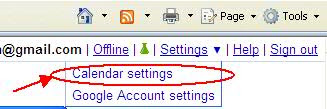
Step 1. Go to google calendar settings -
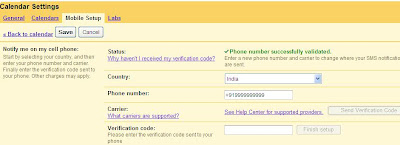
Step 2. Register your mobile number with google -
Step 3. While adding an event/reminder to a date on google calendar, choose SMS as reminders option. You can choose to receive alert as an email and popup as well.

All set. Now jump on that important reminder as an when it comes to you SMS inbox.
important tasks.
There is much more to it though - Google also offers to send SMS to your cellphone to remind about the events setup in your calendar, absolutely free.
Though there might be several service providers available offering this service free, but as you can even integrate google calendar with your gmail, using google
calendar as free reminder service makes it more convenient.
It works with almost all telecom circles in India, like Airtel, Vodafone, Idea etc.
All you have to do is register your mobile phone number with google.
And next time when you add an event to google calendar, you can choose to receive the
reminder on your mobile phone as an SMS, anytime before the event.
Here are the steps to set it up -
Step 1. Go to google calendar settings -

Step 2. Register your mobile number with google -

Step 3. While adding an event/reminder to a date on google calendar, choose SMS as reminders option. You can choose to receive alert as an email and popup as well.

All set. Now jump on that important reminder as an when it comes to you SMS inbox.
Date Picker for Excel Sheets

Found a nice add-on for Microsoft Excel 2007 that allows you to add a date picker in a excel sheet cell.
It comes really handly when you need to quickly add a date (Current date or any other) in a excel sheet cell. This add-on gives some options to customize as well
like using a cell icon etc.
For details check out MS Excel Date Picker
Download add-on at MS Excel Date Picker add-on download
Wednesday, June 30, 2010
What is MAC address and how to find it?
What is MAC address?
The MAC address is a unique value associated with a network adapter. MAC stands for Media Access Control.
The MAC address (also known as the physical address) is your computer's unique hardware number. When you're connected to the Internet from your computer (or host as the Internet protocol thinks of it), a correspondence table relates your IP address to your computer's physical (MAC) address on the LAN. This is how the router knows where to send IP packets destined for your system. MAC addresses are also known as hardware addresses or physical addresses.
MAC addresses are 12-digit hexadecimal numbers (48 bits in length). By convention, MAC addresses are usually written in one of the following two formats:
MM:MM:MM:SS:SS:SS
MM-MM-MM-SS-SS-SS
The first half of a MAC address contains the ID number of the adapter manufacturer. These IDs are regulated by an Internet standards body (see sidebar). The second half of a MAC address represents the serial number assigned to the adapter by the manufacturer. In the example,
00:A0:C9:14:C8:29
The prefix
00A0C9
indicates the manufacturer is Intel Corporation.
How do I find my computer's MAC address?
It's quite easy to find your PC's MAC address -
The list below summarizes options to find a computer's MAC address:
* Windows 95 and newer: winipcfg
* Windows NT and newer: ipconfig /all
* Linux and some Unix: ifconfig -a
* Macintosh with Open Transport: TCP/IP Control Panel - Info or User Mode/Advanced
* Macintosh with MacTCP: TCP/IP Control Panel - Ethernet icon
Also check this link
and this link.
The MAC address is a unique value associated with a network adapter. MAC stands for Media Access Control.
The MAC address (also known as the physical address) is your computer's unique hardware number. When you're connected to the Internet from your computer (or host as the Internet protocol thinks of it), a correspondence table relates your IP address to your computer's physical (MAC) address on the LAN. This is how the router knows where to send IP packets destined for your system. MAC addresses are also known as hardware addresses or physical addresses.
MAC addresses are 12-digit hexadecimal numbers (48 bits in length). By convention, MAC addresses are usually written in one of the following two formats:
MM:MM:MM:SS:SS:SS
MM-MM-MM-SS-SS-SS
The first half of a MAC address contains the ID number of the adapter manufacturer. These IDs are regulated by an Internet standards body (see sidebar). The second half of a MAC address represents the serial number assigned to the adapter by the manufacturer. In the example,
00:A0:C9:14:C8:29
The prefix
00A0C9
indicates the manufacturer is Intel Corporation.
How do I find my computer's MAC address?
It's quite easy to find your PC's MAC address -
The list below summarizes options to find a computer's MAC address:
* Windows 95 and newer: winipcfg
* Windows NT and newer: ipconfig /all
* Linux and some Unix: ifconfig -a
* Macintosh with Open Transport: TCP/IP Control Panel - Info or User Mode/Advanced
* Macintosh with MacTCP: TCP/IP Control Panel - Ethernet icon
Also check this link
and this link.
Monday, May 24, 2010
Data Recovery Software with free License
In addition to one of my earlier post on Data Recovery tools for free, Here is another option to recover your lost data.
iCare Data Recovery Software is dedicated in most frequently data recover like formatted hard drive, MBR (Mast Boot Record) corrupted, bad boot sector, drive inaccessible, partition unreadable, partition deleted, software operation failure like Partition Magic caused data loss, Ghost failure, virus attacked, etc.
iCare Data Recovery can easily recover files from wrong formatted drives, unexpectedly file deletion, raw drive or raw file system, virus attack, partition deleted, software crash etc. It can recover any deleted files like photos, documents, mp3, outlook file, presentations, and it also works with any type of storage media like hard drive, removable hard drive, digital camera sd card, usb drives, ipod, memory card etc.
You can download the full version of this software from here - Download the Full version here
And the License code is : “2K1XB2X964MPHOCJ8M1RYIJF0OVHFOFH”
iCare Data Recovery Software is dedicated in most frequently data recover like formatted hard drive, MBR (Mast Boot Record) corrupted, bad boot sector, drive inaccessible, partition unreadable, partition deleted, software operation failure like Partition Magic caused data loss, Ghost failure, virus attacked, etc.
iCare Data Recovery can easily recover files from wrong formatted drives, unexpectedly file deletion, raw drive or raw file system, virus attack, partition deleted, software crash etc. It can recover any deleted files like photos, documents, mp3, outlook file, presentations, and it also works with any type of storage media like hard drive, removable hard drive, digital camera sd card, usb drives, ipod, memory card etc.
You can download the full version of this software from here - Download the Full version here
And the License code is : “2K1XB2X964MPHOCJ8M1RYIJF0OVHFOFH”
Thursday, February 11, 2010
Edit your PDF Files for Free
If your looking for basic editing of your PDF files, Open Office comes very handy. Extremely easy to install and use.
Open office version 3 and above support editing of PDF files. You can download the latest Open Office here. As of date, the latest release is Open Office version 3.2.
Once you download and install Open Office, you would need to download and install 'Sun PDF Import Extension'. It can be downloaded here. To install for windows, you can simply download and dbl-click on the downloaded '.oxt' file. Or else you can open new document (or spreadsheet etc) in Open Office -> go to Tools -> Extension Manager, and install it.
Open 'Draw' (File -> New -> Drawing), then in Draw, simply open the PDF file to edit it.
Best part about Open Office PDF editor is, it retains all the original formatting.
Open office version 3 and above support editing of PDF files. You can download the latest Open Office here. As of date, the latest release is Open Office version 3.2.
Once you download and install Open Office, you would need to download and install 'Sun PDF Import Extension'. It can be downloaded here. To install for windows, you can simply download and dbl-click on the downloaded '.oxt' file. Or else you can open new document (or spreadsheet etc) in Open Office -> go to Tools -> Extension Manager, and install it.
Open 'Draw' (File -> New -> Drawing), then in Draw, simply open the PDF file to edit it.
Best part about Open Office PDF editor is, it retains all the original formatting.
Subscribe to:
Posts (Atom)